
Medical and surgical logbook
Logitbox LtdMedical
2.36.00 Reviews
- Version
- 202607291
- Installs
- 10.00K
- Age Rating
- Everyone
Screenshots
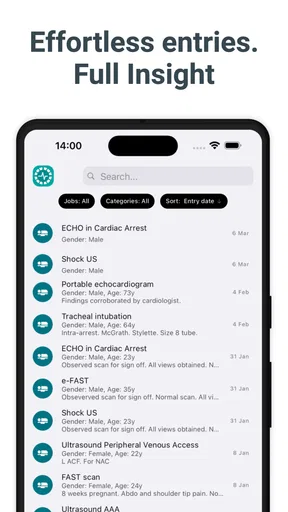
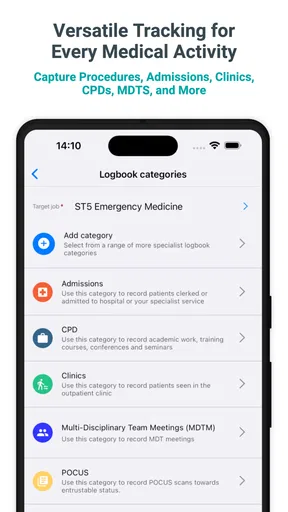
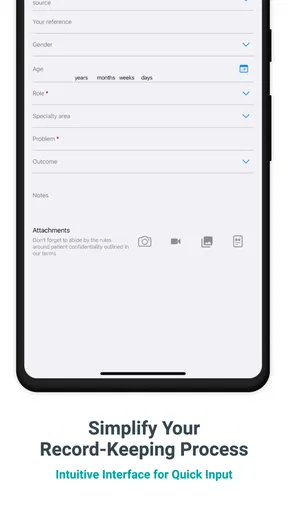
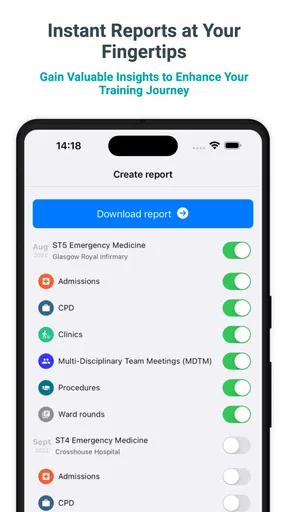
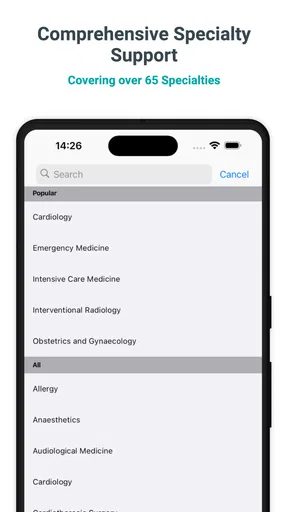
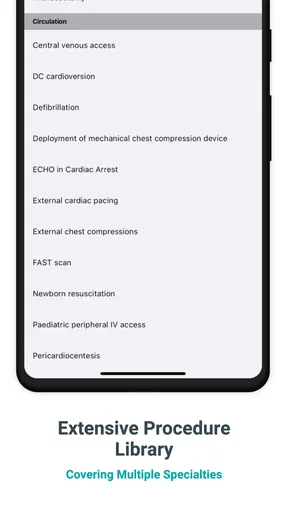
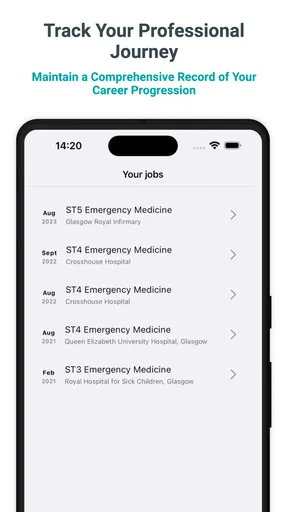
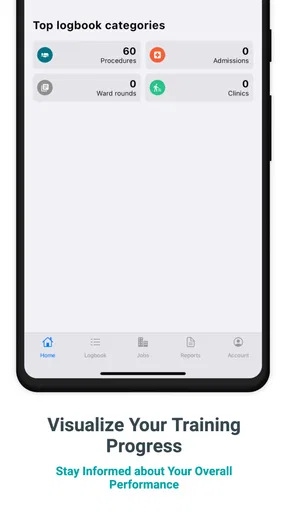
Our Review of Medical and surgical logbook
 Analysis by Appyee
Keeping a reliable medical record is harder than it sounds. A busy placement, a clinic shift, or a day split between outpatient work and admissions can leave important details scattered across paper notes, messages, and memory. I tested Medical and surgical logbook as a focused way to bring those records together, and I found that its value comes from being deliberately narrow rather than trying to become a complete hospital system.
This is a free medical app from Logitbox Ltd, aimed at recording procedures, clinics, outpatients, admissions, and academic activity. Its short description calls it a medical and surgical logbook, which is a fair summary of the experience: it is a personal tracking tool for people building a structured record of clinical work. The app has an Everyone age rating, so its presentation is not framed as restricted content, although the information entered into it may still be highly sensitive in real use.
I would not treat it as a replacement for official clinical documentation, an electronic health record, or a secure institutional system. I see it instead as a companion for organizing your own learning and activity. That distinction matters, especially when deciding what patient information belongs in a personal app.
How the logbook feels to read and navigate
The strongest first impression is its practical purpose. Rather than surrounding the user with general medical articles or a long list of unrelated tools, the app is built around logging work. That focus can be helpful for a student or trainee who wants to record an event soon after it happens, before the details blur together.
In my experience, a logbook works best when the entry process matches the way a clinical day unfolds. You may move from a clinic to a procedure area and then to teaching or academic work. Treating each activity as something worth recording makes it easier to build a useful history instead of relying on a single end-of-week memory session.
Readable organization is especially important for a logbook because the app is not only about entering information. The real payoff comes later, when you need to review what you have done, identify gaps, or prepare for a discussion with a supervisor. A good personal workflow is to make a short entry immediately after an activity, then use quieter time to add reflective notes or learning points.
The app’s narrow scope also reduces one common problem with broad productivity tools: spending more time designing a tracking system than using it. A spreadsheet can be extremely flexible, but it asks you to create headings, filters, and conventions yourself. This app starts from the assumption that clinical activity is the thing you want to record, which makes the purpose easier to understand.
That said, users who expect a polished, modern dashboard may find the experience less reassuring. The average rating is 2.3 from roughly 75 ratings, with six written reviews, so the public response is mixed and relatively small. I would read that as a reason to test the workflow carefully before depending on it for an important portfolio, rather than as proof that it cannot be useful.
Making entries useful instead of merely complete
A practical tip is to decide on a personal minimum for every entry. I would record the activity, the setting, my role, and one learning point. That gives the logbook more value than a bare count. For example, “assisted with procedure” says little by itself; adding what I observed, what I performed under supervision, and what I need to practise turns the record into a revision aid.
This is one of the less obvious trade-offs of a dedicated logbook. It can encourage consistency, but it cannot supply the reflection that makes a record meaningful. If you enter vague notes, you will later have a neatly stored collection of vague notes. The app is most useful when you treat each record as a prompt for accurate, concise reflection.
I would also avoid using patient names, full dates of birth, addresses, or other direct identifiers in a personal log. A safer approach is to use a local reference that has no meaning outside your approved workplace system, while keeping the clinical description general enough to protect privacy. The logbook can help you organize your learning, but it should not become an unofficial copy of patient records.
Using it across different abilities and clinical situations
Accessibility is not only about whether text can be read. For a medical logbook, it also includes whether someone can enter information with limited dexterity, use it while tired, understand the structure under pressure, and return to an entry without losing context. I found the app easier to judge as a working notebook than as a fully inclusive clinical platform, because its usefulness depends heavily on the user’s device, habits, and environment.
Readability for long days and repeated review
People who work with small text, glare, or visual fatigue should check the app on their own phone before committing to it. A logbook may be opened in bright corridors, dim rooms, or during a late study session, and the same screen can feel comfortable in one setting and tiring in another. I would increase the device’s text size where possible, keep entries short, and avoid packing several ideas into one note.
Short, consistent wording helps more than it first appears. If every record follows the same order, scanning becomes easier for users with attention difficulties or limited working memory. I would use a simple pattern such as activity, role, outcome, and next action. This also makes later review faster because the important information appears in a familiar place.
For users who rely on screen readers or other assistive technology, the sensible step is a small trial rather than an assumption. Enter a sample procedure, move through the relevant controls, and try to reopen the record. If labels are unclear or the focus order is awkward on your device, that friction could become significant when you are logging several activities in succession. I cannot recommend it as a certified accessible product, but I can recommend testing the exact tasks you need before building a portfolio around it.
Motor, sensory, and cognitive demands
Clinical work often leaves little room for precise tapping. Gloves, wet hands, tremor, pain, fatigue, or simply carrying equipment can make a small-screen form frustrating. I would not try to create a detailed entry in the middle of a procedure. A better workflow is to jot down a privacy-safe reminder immediately afterward, then complete the record when seated and able to concentrate.
That approach also helps users with cognitive fatigue. Logging everything at the busiest moment creates pressure and increases the chance of omissions. A two-stage routine works better: capture the minimum safe reminder, then expand it during a planned review. The trade-off is that you must protect time for the second stage, otherwise the logbook becomes a collection of unfinished prompts.
Keyboard access, dictation, and device-level accessibility tools may make a major difference, but their usefulness can vary with the phone and operating system. I would test dictation with clinical terms before trusting it. Automatic transcription can mishear abbreviations or procedure names, and an incorrect clinical word is worse than a short, carefully typed note. For sensitive material, I would also consider where spoken input might be overheard.
Users with dyslexia or attention-related difficulties may benefit from separating factual recording from reflection. First write what happened in plain language. Then add a second sentence about what you learned or need to follow up. This reduces the mental load of trying to produce a polished narrative while also remembering the clinical details.
Access during placements, travel, and changing routines
A realistic scenario is a trainee moving between a morning outpatient list, an afternoon teaching session, and an evening review at home. The app’s coverage of clinics, outpatients, admissions, procedures, and academia fits that mixed routine better than a notebook dedicated to only operations. I would make entries at natural transition points rather than after every individual event: after leaving the clinic, after completing the ward work, and during the scheduled academic review.
That workflow has an important privacy advantage. It reduces the temptation to write while standing in a public area or while a patient or colleague can see the screen. It also gives you a moment to check that the entry contains learning information rather than unnecessary identifying details.
Situational access can still be limited by battery, connectivity, interruptions, and institutional rules. I would not assume that a personal logbook is appropriate on every ward device or on a shared phone. Before using it during placement, check the local policy on personal devices and clinical information. If the environment does not permit safe use, write down only an approved non-identifying reminder through an authorized method and transfer the learning record later.
The app is free to download, which lowers the barrier to trying it. It also includes in-app purchases ranging from $5.49 to $47.99 per item, so I would examine the purchase screen carefully before treating the free starting point as the complete long-term arrangement. For a student with a tight budget, that matters; for a department considering it for a group, it matters even more because individual purchasing may not suit institutional workflows.
Where the usual alternatives are stronger
A paper logbook remains attractive when speed, visibility, and independence from a phone matter most. It can be opened instantly, annotated with a pen, and used in places where devices are discouraged. Its weakness is later searching, copying, and protecting the record if the notebook is lost. I would choose paper for quick field notes only when the information is safe to write there, then transfer approved learning details into a more durable system.
A spreadsheet is better for users who want custom columns, sorting, totals, or a personal audit trail. It can also be adapted for unusual training requirements. The cost is setup and maintenance: you must design the structure, keep it consistent, and make sure it remains usable on a small screen. Medical and surgical logbook is more focused, but that focus may feel restrictive if your program requires a very specific assessment format.
A general notes app is often the easiest option for free-form reflection and voice input. It may be more comfortable for users who need larger text, handwriting, or flexible formatting, depending on the device. However, it usually requires more discipline to keep procedures, clinics, admissions, and academic work findable. I would choose the dedicated logbook when structured clinical tracking is the priority, and a notes tool when reflective writing or accessibility customization is more important.
An official training portfolio or workplace record is the better choice when supervisors must verify activity, when evidence must be submitted formally, or when patient-related information is governed by institutional controls. This app can support personal preparation, but I would not assume that an entry here automatically counts toward a training requirement. Keep the authoritative record wherever your program requires it.
Remaining barriers worth considering
The biggest barrier is not one particular screen; it is the gap between personal convenience and professional governance. A medical logbook can feel private because it sits on your phone, but that does not make it suitable for storing identifiable clinical details. Users who need formal sharing, supervisor sign-off, audit history, or institution-managed security may outgrow it quickly.
Another limitation is the need for self-discipline. The app can give your activities a home, but it cannot remind a supervisor to validate them or decide whether a record is sufficiently detailed. If your course has mandatory categories, you should compare its required evidence with the app’s workflow before relying on it. A simple trial with several representative entries will reveal more than a quick glance at the description.
The developer is Logitbox Ltd, and the current version is 202607291, with support beginning at Android 9. That makes device compatibility a practical check for anyone using an older phone. I would install it on the device you actually carry during placement, not just on a newer tablet at home, because typing comfort, visibility, and responsiveness can change considerably between screens.
The public reach is modest, with over 10 thousand installs. That is enough to show that other users are trying the concept, but it does not give me the confidence of a widely established clinical platform. Combined with the low average rating, I would keep an independent backup of important non-sensitive learning records while evaluating it. I would not wait until the end of a rotation to discover that the workflow does not suit me.
My inclusive verdict for trainees and clinical learners
I see Medical and surgical logbook as a focused personal organizer for people who want one place to track clinical activity and academic development. Its best audience is a student, junior clinician, or trainee who values a dedicated structure and is willing to create a careful privacy-conscious routine around it. It is particularly sensible for someone whose week moves between procedures, clinics, outpatients, admissions, and teaching rather than staying in one narrow setting.
I would recommend trying it if you want to replace loose paper notes or an improvised spreadsheet, but I would begin with a small, non-identifying sample. Test readability at the times you actually work, try your preferred typing or dictation method, and see whether you can review entries without confusion. Those checks answer the accessibility questions that no general description can answer for every device or user.
I would skip it if you need a formally verified portfolio, shared supervisor access, advanced reporting, or a workplace-approved record system. I would also choose another option if motor or visual needs make the app uncomfortable and your device’s accessibility features do not solve the problem. A flexible notes tool, customized spreadsheet, paper notebook, or official institutional platform may be more inclusive in those circumstances.
My final view is cautiously positive: the concept is useful, and the coverage of both clinical and academic activity gives it a practical place in a trainee’s routine. But the safest and most inclusive way to use it is as a personal learning log, never as a substitute for official patient documentation. Start with a simple entry pattern, protect privacy, keep a backup of important learning information, and confirm that its controls work for your hands, eyes, attention, and working environment. Used with those boundaries, Medical and surgical logbook can make clinical experience easier to remember and review, even though it is not the right tool for every learner or every institution.
Verdict
Strengths of Medical and surgical logbook
- Keeps procedure records organized in one searchable place.
- Supports quick updates after surgeries or clinical activities.
- Useful for reviewing personal experience over time.
- Can help prepare accurate information for training assessments.
- Reduces reliance on scattered paper notes and spreadsheets.
Limitations of Medical and surgical logbook
- May require regular backups to prevent losing important records.
- Data entry can become time-consuming during busy clinical shifts.
- Some features may be limited without an internet connection.
- Incorrect entries could affect the accuracy of experience reports.
- Sensitive medical information requires careful privacy management.
Similar Picks in This Category
View All
WebMD: Symptom Checker
WebMD, LLC4.1

Microphone Amplifier
DOSA Apps4.2

Anatomy Learning - 3D Anatomy
3D Medical OU4.5

Period Tracker and Calendar
SimpleInnovation4.9

GoodRx: Prescription Coupons
GoodRx4.8

CVS Health
CVS Pharmacy4.5
Frequently Asked Questions
What is Medical and Surgical Logbook used for?
Medical and Surgical Logbook is designed to help healthcare students, residents, and professionals record and organize clinical experiences. You can document procedures, surgeries, diagnoses, patient encounters, and relevant notes in one place. It is especially useful for tracking progress toward training requirements, preparing reports, and maintaining a personal overview of practical experience over time.
Can I customize entries for different medical specialties or training programs?
Yes, the app is suitable for a variety of specialties and clinical training paths. Depending on the available fields and settings, users can record details such as procedure type, role performed, date, location, supervisor, patient category, and outcome. This flexibility makes it useful for surgery, emergency medicine, nursing, dentistry, and other healthcare-related programs with different documentation requirements.
Does Medical and Surgical Logbook protect sensitive patient information?
Users should treat every entry as potentially sensitive and avoid entering identifiable patient information unless their institution explicitly permits it and adequate protection is available. A logbook should normally use anonymized details, such as a case number or general patient category. Before using the app professionally, review its privacy policy and confirm that it meets your hospital, university, or regulatory requirements.
Can I export or share my medical logbook records?
The ability to export or share records depends on the version of the application and the features enabled on your device. If export options are available, they may help you create summaries, submit training documentation, or keep a backup. Always check the generated file carefully and remove confidential information before sharing it with supervisors, institutions, or other services.
Is Medical and Surgical Logbook a replacement for official clinical documentation?
No. The app should be considered a personal tracking and organization tool rather than an official medical record system. It does not replace hospital documentation, electronic health records, operative reports, or institutional logbooks. Information entered into the app should be accurate and updated responsibly, but official records and training requirements must always be completed through the systems approved by your organization.
